

iPhone 6 Won’t Turn On? Here's What You Can Do About It

offer_banner_mobile
All Posts

Despite its 2014 release, the iPhone 6 is a real workhorse of a phone. It has proven its resilience through a battery-related performance throttling scandal, and continues to be as snappy and reliable as ever for hordes of happy owners.

iPhone 6 won't turn onOccasionally, an iPhone 6 won’t turn on – but this issue isn’t necessarily insurmountable. It’s a common enough glitch that can affect any phone model, and there’s no need to panic just yet.

So, what do you do if your iPhone 6 won’t turn on? Simple – follow our easy to use troubleshooting guide, below.  

Repair my device


You know the drill – try a forced restart

iPhone 6 hard resetPhoto Credit: iPhoneHacks

It’s one of the mysteries of the world (okay, maybe not), but a hard reset often works wonders when troubleshooting a whole range of issues, making it our go-to first step whenever we want to kickstart an uncooperative iPhone.

The first thing you should do is perform a forced restart on an iPhone 6 – simply press and hold the Home button and Side buttons for 10 seconds.

The Apple logo should appear, indicating that you’ve successfully performed the forced restart.


Power to you

iPhone 6 chargingIf the hard reset doesn’t work, try connecting your phone to a power source and leaving it alone for a while.

It could potentially take up to an hour for you to see results, but after a few minutes the phone ought to show you the “charging” screen. If you still don’t see the charging screen after one hour, Apple’s support page suggests that you try a different USB cable and adapter, as well as check the ports to make sure they’re clear of any debris that might be inhibiting the connection.


Try for a smooth recovery

If you’re getting stuck at startup – some users have reported seeing either a red or blue screen, or freezing of the white Apple logo – you can connect your phone to a computer and launch it into recovery mode.

First, connect your iPhone to your computer and open iTunes. When your phone is connected to iTunes, hold down the Sleep/Wake and Home buttons at the same time. Keep them pressed even after the Apple logo appears, until you see the Recovery mode screen. When the Recovery mode screen pops up, you can let go.

It’ll then ask you whether you want to update or restore. Select update, and iTunes will reinstall your iOS.

Now, as per the Apple support page, iTunes will do its best to reinstall the iOS without erasing any of your data – but they don’t make any promises. That said, most of the time this step goes smoothly, and your data is still saved after the reinstallation.


Clear your proximity
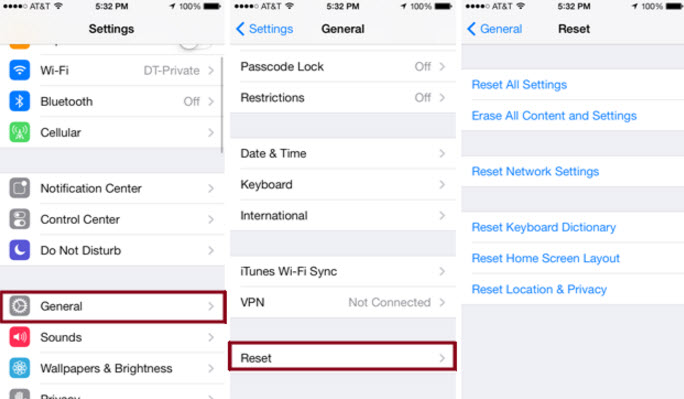
iPhone 6 reset all settings

Photo Credit: imyfone.com

It’s rare, but possible, that your phone’s proximity sensor might be on the fritz. The proximity sensor is the pretty ingenious thing that dims your iPhone’s screen when you hold the phone up to your ear.

If the proximity sensor is acting up, it might be dimming your screen even when your phone isn’t next to your ear, causing it to appear to be off or have a broken screen. A hard reset should cause your phone’s screen to turn back on – but if this a recurring issue, you could try resetting the proximity sensor to get it working again.

The only way to do this is to reset all settings, which will erase all the preferences and settings that you have saved on the phone – and this can be a bit of a pain. But, if you feel it’s worth a try, you can go to Settings > General > Reset > Reset all settings.  

Repair my device


Perform a factory restore

This isn’t exactly the nuclear option, but it does guarantee that you’ll lose all saved data and settings on your phone – photos, videos, audio recordings, saved messages, etc. If you backup your data regularly, then losing all that data might not be as big of a deterrent when trying this step.

And, of course, we recommend that you backup your data on a regular basis anyway – it can provide peace of mind in a whole range of scenarios, from a lost or stolen phone, to liquid damage, to any other malfunction that can cause you to lose data.

In any case, follow the directions above to send your iPhone 6 into recovery mode.

Then, instead of hitting “update,” hit restore. This will reset your iPhone back to how it was the day you got it, and hopefully will take care of any issues that had persisted.


You can count on Puls

Puls iPhone 6 repair

If none of these troubleshooting tips work for you, it may be time to call in the big guns. Don’t worry, Puls makes this easier than ever. Simply get online and book an appointment with a certified Puls technician.

We’ll be happy to meet you at the time and place of your choice – be it home, office – even the gym! And, of course, all parts and services rendered by Puls are covered by our lifetime guarantee. To get $10 off your first appointment with us, click here.


Jake S.
Jake Sherman is a professional writer with a background in journalism. He is fascinated by home appliances and how they work. He enjoys breaking down complex topics and explaining them in interesting ways. He has been a Puls staff writer for two years. When he's not writing, he enjoys trotting around the globe, trying unfamiliar foods, and testing unmarked doors to see if they're locked.
Related Posts

Home maintenance can feel overwhelming when it’s framed as one endless checklist. When everything seems important at once, it’s easy to delay action altogether and hope nothing urgent pops up. A room-by-room strategy makes home care feel more manageable. Instead of thinking about your home as one big project, you focus on individual spaces. This makes it easier to notice small changes, address issues early, and avoid the kind of problems that grow quietly over time. Kitchen: Where Wear and Tear Adds Up Fast Kitchens combine water, electricity, heat, and daily use, which naturally increases the chances of things wearing down. Under-sink leaks, loose outlets, and aging fixtures are common early warning signs. Because many kitchen components are tucked away inside cabinets, small problems often stay hidden until damage spreads. Catching these issues early keeps repairs simpler, faster, and far less expensive. Bathrooms: Constant Moisture, Constant Risk Bathrooms deal with daily humidity, which puts ongoing stress on plumbing connections, fixtures, and surfaces. Slow drains, loose faucets, or subtle discoloration around fixtures are often the first signs that something needs attention. Moisture-related issues rarely resolve on their own. Addressing them early helps prevent mold growth, water damage, and structural problems that can disrupt your home and budget. Living Areas: Subtle Signals Matter In living rooms and bedrooms, maintenance issues often show up visually or electrically. Small wall cracks, flickering lights, or loose mounted items can indicate settling, wiring wear, or anchor problems inside the walls. Because these changes happen gradually, they’re easy to normalize. Paying attention early keeps fixes straightforward and prevents damage from spreading behind the scenes. Entryways and Hallways: High Traffic, High Stress Doors, frames, and walls in high-traffic areas experience constant movement and pressure. Sticking doors or shifting frames can be early signs of alignment issues or normal structural movement that needs adjustment. Handling these issues early keeps everyday wear from turning into long-term damage that affects multiple rooms. Laundry Areas: Small Spaces, Big Impact Laundry hookups are one of the most common sources of unnoticed leaks. Hoses, valves, and drains wear down slowly, and even minor drips can lead to significant water damage if left unchecked. Because laundry areas are often out of sight, problems here tend to go unnoticed longer than they should. Regular inspection and timely service can prevent costly flooring and wall repairs. Why a Room-by-Room Approach Works Breaking maintenance down by room helps homeowners feel more in control of their home. It creates a natural rhythm for checking key areas without feeling like everything needs attention at once. This approach also makes it easier to prioritize. Rooms with water, electricity, or heavy use naturally deserve more frequent attention than low-impact spaces. How This Strategy Helps With Budgeting Room-based maintenance spreads costs out over time instead of letting them pile up into emergency repairs. Small, planned fixes are easier to budget for than sudden, expensive problems. Homeowners who take this approach often find they spend less overall—not because they avoid repairs, but because they handle them at the right moment. Peace of Mind Comes From Knowing What’s Normal When you check your home consistently, you start to recognize what’s normal and what’s new. That awareness makes it easier to spot issues early and take action without panic. Instead of wondering whether something has “always been like that,” you can make informed decisions with confidence. Where Professional Help Makes the Biggest Difference Professional technicians understand how issues in one room can affect the rest of the home. A trained eye can spot early warning signs that aren’t obvious to homeowners. Puls technicians can inspect multiple areas efficiently and handle repairs across rooms and systems, making it easier to stay ahead of maintenance without juggling multiple service providers. Why Proactive Service Is Easier Than Reactive Repairs Emergency repairs often come with stress, scheduling pressure, and limited options. Proactive service allows homeowners to plan repairs around their schedule and avoid last-minute decisions. Calling a Puls tech early helps keep home maintenance predictable, manageable, and far less disruptive. Consistency Beats Perfection Home care isn’t about fixing everything at once or chasing an ideal standard. It’s about steady attention and timely action. A professional-first, room-by-room approach keeps your home running smoothly, protects its value, and helps you avoid costly surprises down the line.

  • 5 min read
  • 05/04/26

Staying on top of home maintenance doesn’t have to feel like a constant project. Most homeowners don’t need more reminders—they need a simpler way to organize what already matters. That’s where a monthly home maintenance calendar comes in. Instead of reacting to issues or juggling long checklists, a calendar-based approach creates a steady rhythm that keeps your home running smoothly throughout the year. Why Monthly Planning Feels Easier Big seasonal lists tend to show up all at once and demand attention when life is already busy. Monthly planning spreads things out so nothing feels urgent or overwhelming. When you know exactly what to focus on each month, home care becomes more predictable—and much easier to fit into real life. How the Puls Home Maintenance Calendar Is Structured The Puls home maintenance calendar is designed to reduce mental load, not add to it. Each month focuses on just three types of tasks, keeping things clear and manageable: Quick Wins Seasonal Must-Dos Call in a Pro Tasks This structure ensures that important maintenance stays on track without turning home care into a full-time job. Quick Wins: Light Tasks That Keep Things on Track Quick wins are small, low-effort actions that help maintain comfort and performance around the home. They’re designed to be fast, easy to remember, and satisfying to complete. These tasks help homeowners feel like they’re staying ahead without committing large amounts of time or energy. Seasonal Must-Dos: Staying in Sync With the Year Every season brings small shifts in how a home is used. Seasonal must-dos help align your home with those changes in a calm, planned way. Because these tasks are anticipated in advance, they don’t come with urgency or stress. They simply support comfort, efficiency, and everyday use as the year progresses. Call in a Pro: Built-In Professional Support Some maintenance tasks are best handled by a professional—not because something is wrong, but because it’s easier and more reliable that way. Each month includes at least one Call in a Pro task, giving homeowners a clear moment to bring in expert help and keep things handled properly without guesswork. Puls technicians fit seamlessly into this system, handling professional tasks efficiently and helping homeowners stay consistent without juggling multiple providers. Why This System Reduces Stress With only three task types to think about, maintenance stays focused and manageable. There’s no pressure to do everything at once, and no feeling that something critical is being missed. Homeowners following a calendar-based approach often feel more confident simply because they know what’s coming next. Consistency Without Perfection This system doesn’t rely on doing everything perfectly. Missing a task one month doesn’t derail anything—the calendar simply brings your focus back the next month. That flexibility is what makes monthly maintenance sustainable and realistic over time. A Calmer, More Organized Way to Care for Your Home When maintenance is predictable and supported, it stops feeling like a chore. It becomes part of the background—quietly supporting comfort, safety, and daily life. A monthly home maintenance calendar turns home care into a steady rhythm, and with Puls technicians available for professional tasks, staying on top of your home feels simple, not stressful.

  • 4 min read
  • 03/23/26

Even in mild climates, decks and fences are exposed to the elements every day. Sunlight fades color and weakens coatings, humidity causes wood to expand and contract, and soil movement shifts posts and support beams. Over time, this wear and tear leads to cracks, discoloration, and loose boards that can compromise safety and appearance.

  • 12 min read
  • 10/28/25